Tuesday, August 10, 2010
If You Can't Read the Small Print in the Steps to Post a Comment
I have noticed that if you cannot see the smaller print in the steps that my son Andrew gave for you to write in comments, just click on the smaller print to magnify it. Then click the back arrow to go back to the steps. It was easy to do-- even for me!


Monday, August 9, 2010
How to Write Comments on Posts
Hey evereyone,
Hope all of you had a great weekend! Just so all of you know, I included some steps and pictures on how to write comments on the posts I leave on this blog. Just follow the six steps below and you'll be commenting and blogging in no time! Please excuse the images if they're a little small, but it's the best I could do.
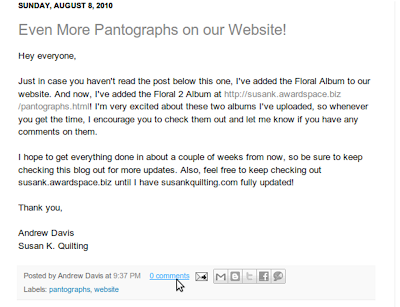
Step 1: Click on the number of comments below the posting you'd like to comment on. It'll be written in blue. In this particular example, there were 0 comments, so the link you're supposed click on reads, "0 comments" in this particular example. Check out the photo below.
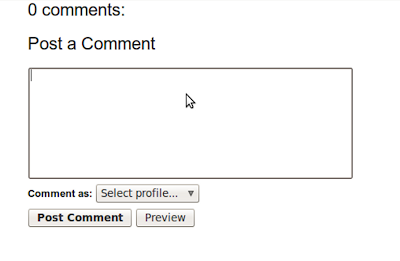
Step 2: A text box will appear, click on it and enter your comment in there. Check out the photo below.
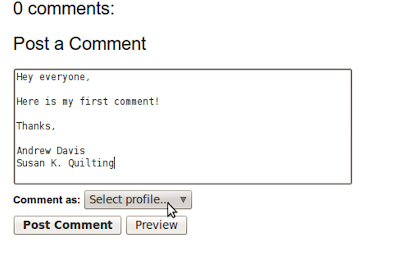
Step 3: This step is probably the most crucial and unfortunately the most confusing. The blogging software we're using wants to know what 'network' you're apart of and what your 'profile' is. To make sure you don't have to worry about this, I created a way where 'anonymous' people can post comments. So after you're done entering in your comment, click on the 'Select profile...' drop down box and select 'Anonymous.' But if you want us to know who you are, please include your name in your comment like I did below. Check out the photo below.
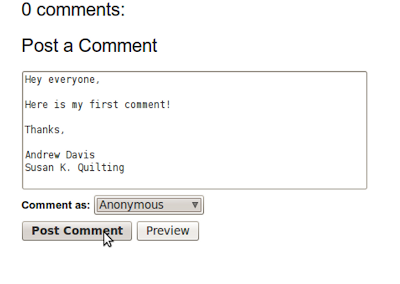
Step 4: After you've selected 'Anonymous' from the drop-down menu, click on the 'Post Comment' button. Check out the photo below.
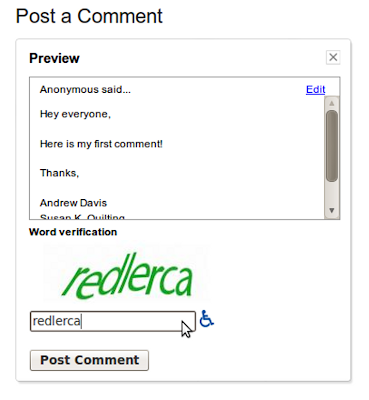
Step 5: Now you'll be prompted to enter in the text that you'll see on your monitor, which is written in a really weird way (this is to ensure that malicious software isn't pulling up my blog and messing around with it - software has a hard time 'reading' weird writing). Check out the photo below.
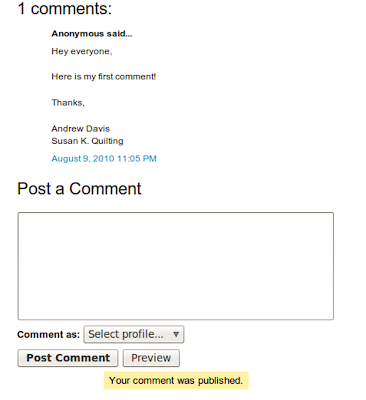
Step 6: Enjoy your comment! If you have any issues with any of these steps, feel free to contact me at andrewjamesdavis@gmail.com!
What you may see whiling writing a comment may not match up perfectly with what you saw in my photos, but don't worry. Keep working on putting up your first comment! Feel free to even write, "This is just a test!" as your first comment!
Thanks everyone,
Andrew Davis
Susan K. Quilting
Hope all of you had a great weekend! Just so all of you know, I included some steps and pictures on how to write comments on the posts I leave on this blog. Just follow the six steps below and you'll be commenting and blogging in no time! Please excuse the images if they're a little small, but it's the best I could do.
Step 1: Click on the number of comments below the posting you'd like to comment on. It'll be written in blue. In this particular example, there were 0 comments, so the link you're supposed click on reads, "0 comments" in this particular example. Check out the photo below.

Step 2: A text box will appear, click on it and enter your comment in there. Check out the photo below.

Step 3: This step is probably the most crucial and unfortunately the most confusing. The blogging software we're using wants to know what 'network' you're apart of and what your 'profile' is. To make sure you don't have to worry about this, I created a way where 'anonymous' people can post comments. So after you're done entering in your comment, click on the 'Select profile...' drop down box and select 'Anonymous.' But if you want us to know who you are, please include your name in your comment like I did below. Check out the photo below.

Step 4: After you've selected 'Anonymous' from the drop-down menu, click on the 'Post Comment' button. Check out the photo below.

Step 5: Now you'll be prompted to enter in the text that you'll see on your monitor, which is written in a really weird way (this is to ensure that malicious software isn't pulling up my blog and messing around with it - software has a hard time 'reading' weird writing). Check out the photo below.

Step 6: Enjoy your comment! If you have any issues with any of these steps, feel free to contact me at andrewjamesdavis@gmail.com!

What you may see whiling writing a comment may not match up perfectly with what you saw in my photos, but don't worry. Keep working on putting up your first comment! Feel free to even write, "This is just a test!" as your first comment!
Thanks everyone,
Andrew Davis
Susan K. Quilting
Sunday, August 8, 2010
Even More Pantographs on our Website!
Hey everyone,
Just in case you haven't read the post below this one, I've added the Floral Album to our website. And now, I've added the Floral 2 Album at http://susank.awardspace.biz/pantographs.html! I'm very excited about these two albums I've uploaded, so whenever you get the time, I encourage you to check them out and let me know if you have any comments on them.
I hope to get everything done in about a couple of weeks from now, so be sure to keep checking this blog out for more updates. Also, feel free to keep checking out susank.awardspace.biz until I have susankquilting.com fully updated!
Thank you,
Andrew Davis
Susan K. Quilting
Just in case you haven't read the post below this one, I've added the Floral Album to our website. And now, I've added the Floral 2 Album at http://susank.awardspace.biz/pantographs.html! I'm very excited about these two albums I've uploaded, so whenever you get the time, I encourage you to check them out and let me know if you have any comments on them.
I hope to get everything done in about a couple of weeks from now, so be sure to keep checking this blog out for more updates. Also, feel free to keep checking out susank.awardspace.biz until I have susankquilting.com fully updated!
Thank you,
Andrew Davis
Susan K. Quilting
New Pantographs... On Our Website!
Hey everyone,
As promised, I have added more pantographs online. However, not on this blog but on our main website. You can check them out, by following http://susank.awardspace.biz/pantographs.html!
So far, I only have pantographs from the Floral Album ready for you, but I promise to have more this week! Please take a look at it whenever you can and let me know what you all think by either replying to this post or writing to us at the email address specified on our info page. Also, I know that the susankquilting.com is not up to date, but I hope that in the next couple of weeks, I'll have it completely up to date and bug-free!
Anyway, I appreciate all of your patience. I'll continue to work on the website and this blog and soon both of them will be up and running and 100% finished!
Oh yeah, I almost forgot, when you get a chance take a look at the rest of the website and even though it's not completely done, I appreciate any feedback you guys can offer!
Thank you again for your patience,
Andrew Davis
Susan K. Quilting
As promised, I have added more pantographs online. However, not on this blog but on our main website. You can check them out, by following http://susank.awardspace.biz/pantographs.html!
So far, I only have pantographs from the Floral Album ready for you, but I promise to have more this week! Please take a look at it whenever you can and let me know what you all think by either replying to this post or writing to us at the email address specified on our info page. Also, I know that the susankquilting.com is not up to date, but I hope that in the next couple of weeks, I'll have it completely up to date and bug-free!
Anyway, I appreciate all of your patience. I'll continue to work on the website and this blog and soon both of them will be up and running and 100% finished!
Oh yeah, I almost forgot, when you get a chance take a look at the rest of the website and even though it's not completely done, I appreciate any feedback you guys can offer!
Thank you again for your patience,
Andrew Davis
Susan K. Quilting
Saturday, August 7, 2010
New Album Uploaded - The Insects Album

Hey everyone,
As promised more pantographs have been uploaded to this blog! To view them, just click on the 'Insects Album' tab near the top! Hope you enjoy them!
Thank you,
Andrew Davis
Susan K. Quilting
Wednesday, August 4, 2010
New Album Uploaded!
Hey everyone,

I'm proud to announce that another album, the Children's Album, has been uploaded! Feel free to check it out and post comments!
Thank you,
Andrew Davis
Susan K. Quilting

I'm proud to announce that another album, the Children's Album, has been uploaded! Feel free to check it out and post comments!
Thank you,
Andrew Davis
Susan K. Quilting
Sunday, August 1, 2010


Subscribe to:
Posts (Atom)